Back up and restore
Back up and restore
Insignal has two kinds of backup. Use continuous backup if you have object storage. Use snapshot files if you do not, and before risky changes.
| Continuous backup | Snapshot file | |
|---|---|---|
| How | Litestream streams the app database to your object storage | sudo insignal backup writes one file |
| How current | About a second behind each change | The moment you run it |
| Set up | Admin › Storage | Nothing |
| Restore | sudo insignal restore |
sudo insignal restore <file> |
Both hold the app database: every user, chart, dashboard, chat and setting. Query result caches and fetched files are left out: they rebuild themselves.
Every restore also needs the recovery key.
The recovery key
Insignal encrypts saved secrets, such as LLM provider keys and source passwords, with the install’s encryption keys (INSIGNAL_ENCRYPTION_KEYS). That value is the recovery key.
- The install prints it once.
sudo insignal recovery-keyprints it again at any time.- It never goes to object storage or into a snapshot.
Keep it in your password manager, away from the machine. Without it, a restore refuses to run, because the saved keys and passwords in the backup could not be read.
Turn on continuous backup
You need an admin role that can manage the system.
- Open Admin › Storage.
- Choose the Store: AWS S3, Google Cloud Storage, Azure Blob Storage or S3-compatible storage.
- Fill in the bucket (for Azure, the container), an optional prefix, and the key. On AWS S3, you may leave the key out to use the machine’s IAM role. Google Cloud Storage takes an HMAC key.
- Choose Test. Insignal writes, reads and deletes a small file and shows each step.
- Choose Save.
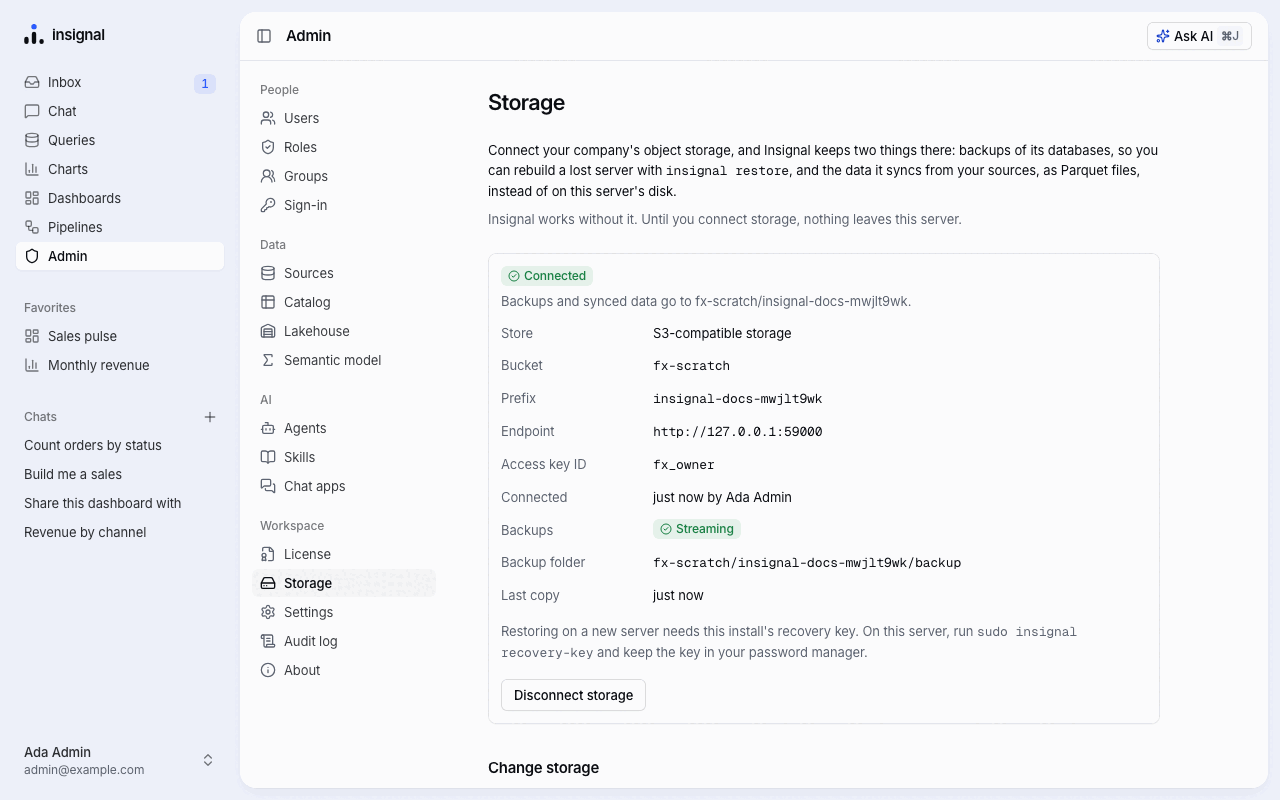
Litestream writes under <prefix>/backup/ in the bucket. The status shows Off, Starting, Streaming or Failing, with the store’s message when it fails, and the time of the last copy. Note the store, bucket, prefix and region: a restore asks for them.
Insignal keeps the store’s secret encrypted in the database. It passes it only to Litestream, never to queries.
Write a snapshot file
sudo insignal backup
It writes insignal-backup-<date>-<time>.tar.gz in the current folder. Pass --out <file> to choose the name. The file is readable by its owner only. Insignal keeps running while it writes.
Copy the file somewhere safe, off the machine.
Restore on a new machine
Restore installs Insignal and puts the backup in place, in one command. Use a fresh machine that meets the requirements, with the DNS name pointing at it.
From object storage:
sudo insignal restore --license <license file>
From a snapshot file:
sudo insignal restore insignal-backup-20261116-093000.tar.gz --license <license file>
It asks what the install asks (domain, certificate), plus the recovery key and, for object storage, where the backup is. To answer up front, use flags:
| Flag | Meaning |
|---|---|
--license, --domain, --tls-cert, --tls-key, --yes |
As for insignal install |
--recovery-key |
The old install’s recovery key. Or set INSIGNAL_RECOVERY_KEY |
--storage-kind |
s3, gcs, azure or s3-compatible |
--bucket |
The bucket, or for Azure the container |
--prefix |
The prefix, as Admin › Storage showed it. Empty for the whole bucket |
--region |
AWS S3: the bucket’s region. S3-compatible: the store’s, if any |
--endpoint |
S3-compatible: the store’s URL |
--access-key-id |
The access key ID, HMAC key ID, or Azure storage account name. Leave out on AWS S3 to use the machine’s IAM role |
--storage-secret |
The secret access key, HMAC secret or account key. Or set INSIGNAL_STORAGE_SECRET |
Pass secrets through the prompt or the environment variables, not on the command line, so they stay out of your shell history.
Before the database goes in place, Insignal checks the backup and checks that the recovery key opens a saved secret. If either fails, it stops and leaves no database behind. Run sudo insignal uninstall --purge to remove the configuration it wrote, then try again.
After a restore:
- People sign in as before, with their own passwords or single sign-on. No new admin is created.
- Every secret except the encryption keys is new.
- If you restored from object storage, backups go on streaming to the same place.
- If the backup holds a newer license than the file you gave, Insignal keeps the newer one.
Upgrades take their own backup
Each insignal upgrade takes a snapshot first. See Upgrade Insignal.