Add LLM provider keys
Add LLM provider keys
Insignal brings no AI model of its own. You connect your company’s own account with an LLM provider, and Insignal calls it with your key. Until an admin connects at least one provider, analytics chat and the other agents cannot answer.
Supported providers
| Provider | What you enter |
|---|---|
| Anthropic | An API key |
| OpenAI | An API key |
| An API key | |
| OpenRouter | An API key |
| Azure OpenAI | The endpoint, such as https://contoso.openai.azure.com, and a key |
| Amazon Bedrock | The region, and either an access key or this server’s AWS role |
Add a key
You need an admin role that can manage agents.
- Open Admin › Agents.
- In Providers, find the provider and choose its add button, such as Add an Anthropic key. For Azure OpenAI and Amazon Bedrock it reads Connect Azure OpenAI or Connect Amazon Bedrock.
- Paste the key, or fill in the connection.
- Choose Test key (or Test connection). Insignal calls the provider and says whether it accepted the key.
- Choose Save. The provider shows Connected.
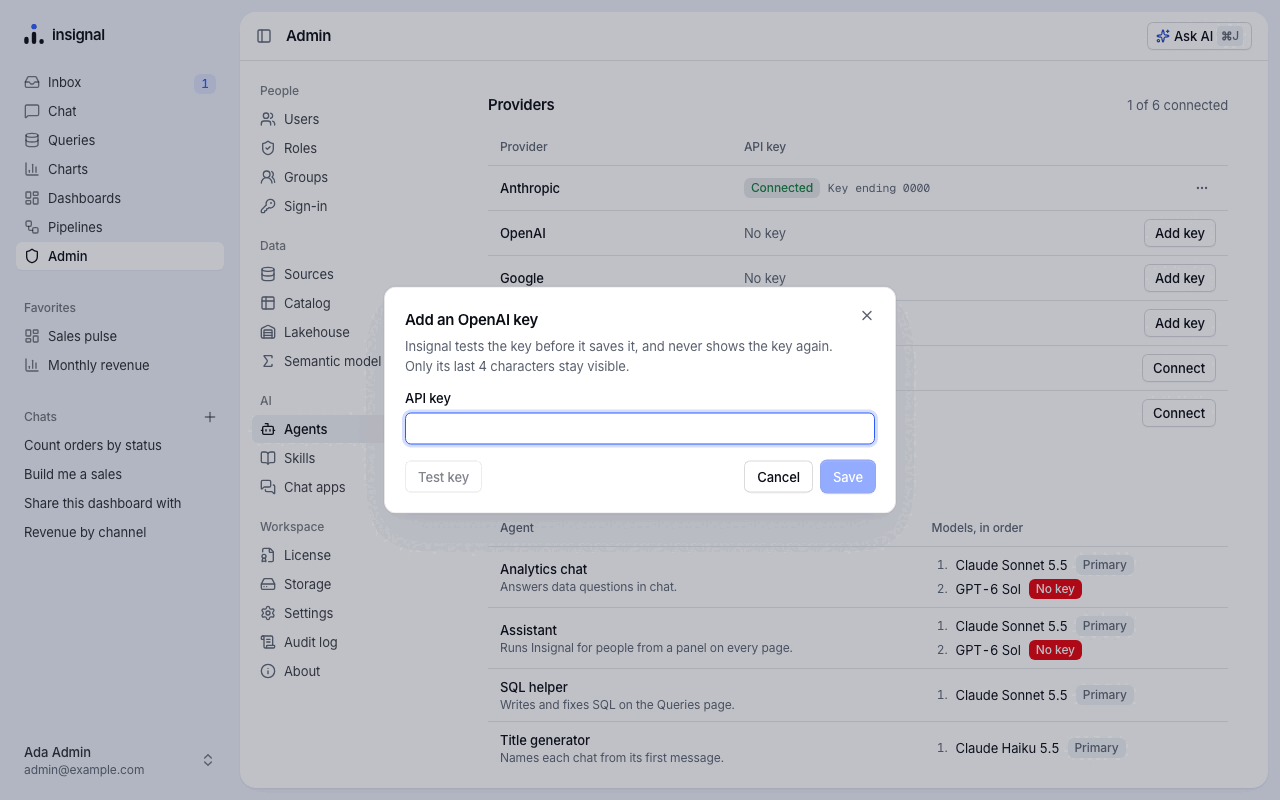
To change a key later, choose Replace the Anthropic key (named for the provider) on its row. To remove it, open the row’s actions menu and choose Remove the Anthropic key. Agents can no longer use that provider’s models until someone adds a key again.
Admins choose which models each agent uses in the same screen. The admin guide on your server, at /docs/admin/, covers it.
Where the keys are kept
- Insignal encrypts each key before it saves it in the app database, with the install’s encryption keys (
INSIGNAL_ENCRYPTION_KEYS). - Keys never reach the AI model, the logs, the events or the audit log. The app never shows a saved key again; it only shows that the provider is connected.
- Backups hold the keys encrypted. A restore on a new machine needs the recovery key to read them.
Network access
The server calls each provider over HTTPS from the machine. Allow outbound HTTPS to the providers you connect:
| Provider | Default address |
|---|---|
| Anthropic | https://api.anthropic.com |
| OpenAI | https://api.openai.com |
https://generativelanguage.googleapis.com |
|
| OpenRouter | https://openrouter.ai/api |
| Azure OpenAI | The endpoint you enter |
| Amazon Bedrock | The AWS endpoints of the region you choose |